Flagship product
Sukuu
School fee management for primary and secondary schools. Fees, installments and payments, with balances that stay correct and roles the server actually enforces.
Sukuu is "school" in Twi. The name is the first thing we were sure of.
The problem
Nobody can say who still owes what
In a great many schools, fee collection runs on a paper receipt book and a spreadsheet, and somebody reconciles the two by hand at the end of every term.
It mostly works, until it does not. A receipt book goes missing and a payment goes with it. A parent pays in four installments across a term and the running balance lives in one person's memory. A bursar spends the last week of term adding up columns instead of collecting fees. A parent is told a figure at the gate that nobody can show them the working for, and a family is chased for money they have already paid.
None of that is anyone's fault. It is what happens when the record of who owes what is kept in two places that have to be married up by hand.
The solution
One record, and it is always right
Sukuu keeps one record of what every student has been charged and what has been paid against it. A cash payment at the desk and a card payment from a parent's phone land in the same ledger, and the balance updates the moment either one does.
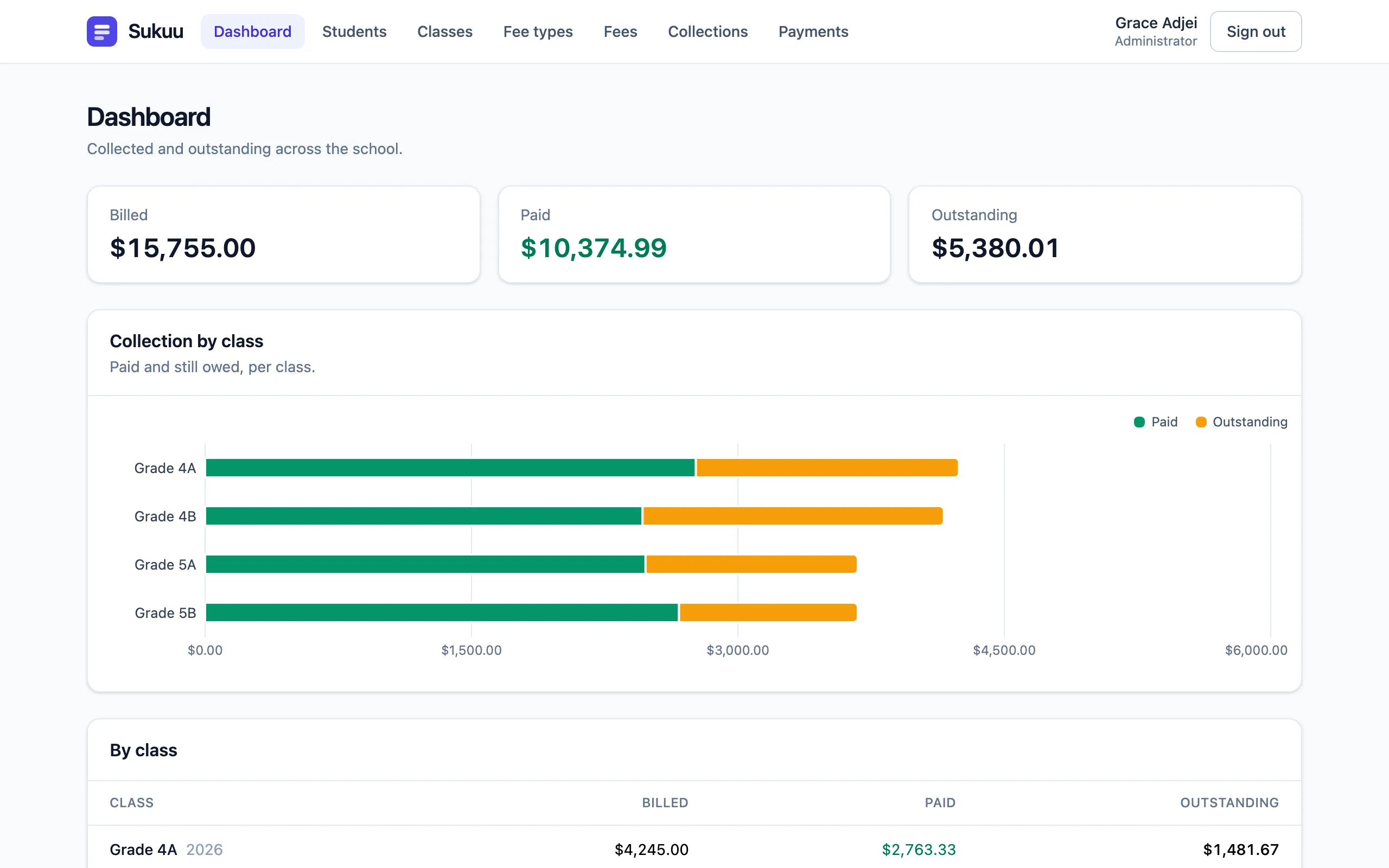
An administrator bills a class in one action. A bursar works from a list of who owes what and records cash on the row. A parent opens their own children's fees, sees the itemised list, and pays some or all of it. The dashboard shows collected against outstanding for the school and for every class — not assembled from a spreadsheet, just there.
The office stops doing arithmetic and goes back to running the school.
What it does today
Built and working
Everything in this list exists in Sukuu now. There is nothing in it we are hoping to get to.
Three roles, enforced on the server
Administrator, bursar and parent. The boundaries live in the API, not in which buttons the interface happens to show, and every denial has a test behind it.
Classes and student records
Set up classes for an academic year, enrol students with admission numbers, and move a student to inactive when they leave. Records are archived, never deleted.
Fee types you define
A name, a default amount and a billing period — per term, monthly or one-time. Tuition, boarding, exam fees, whatever your school actually charges.
Charge a student, or a whole class
Bill one student individually, or apply a fee to every student in a class in a single action instead of forty.
Installments and partial payments
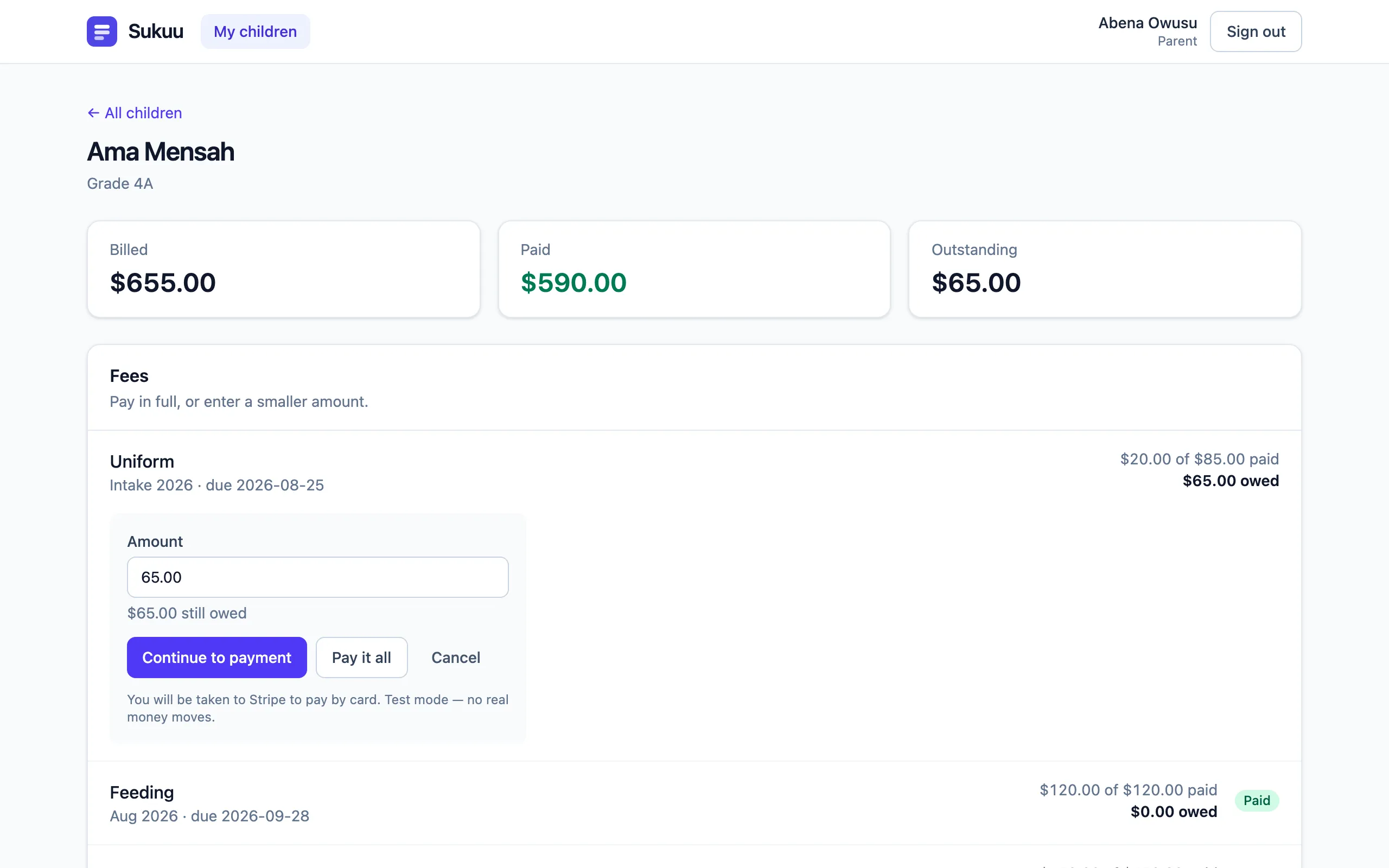
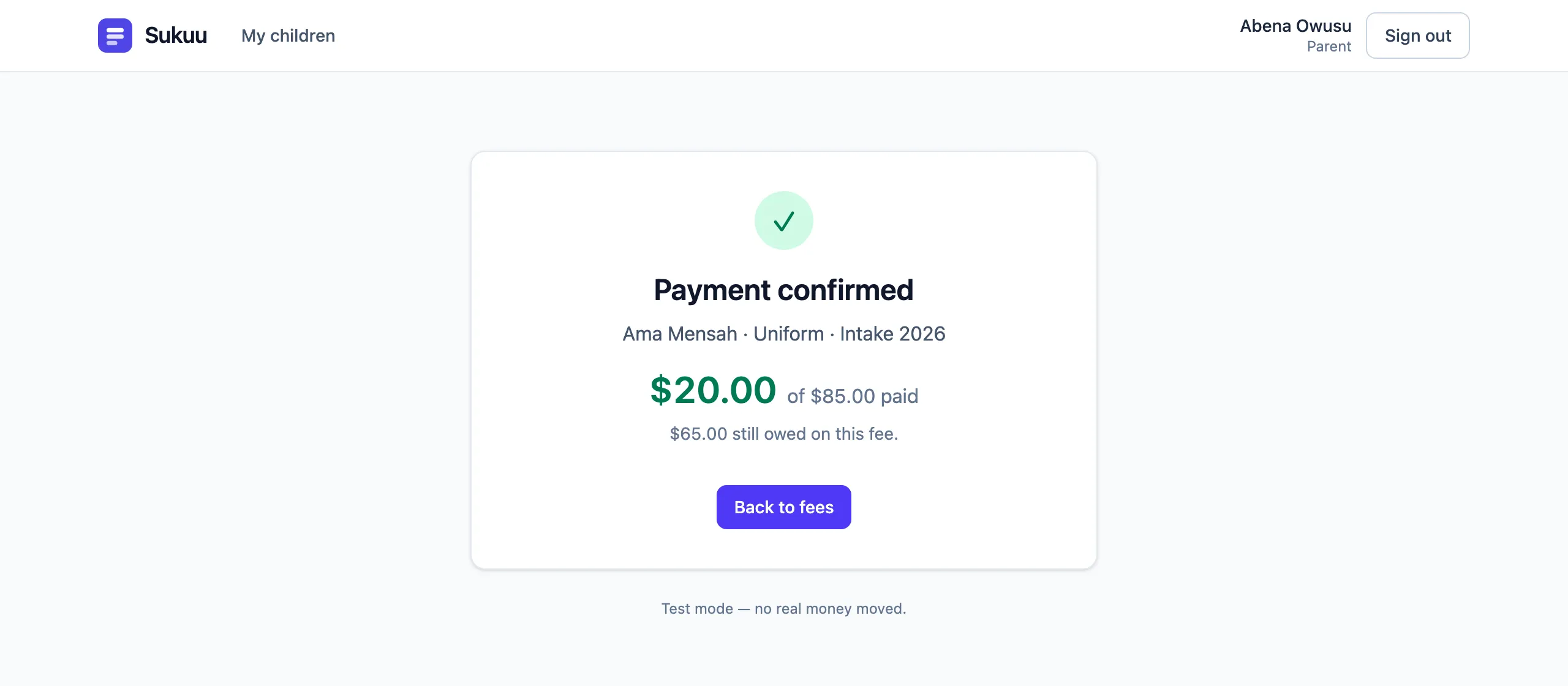
A parent pays a little at the start of term and more when they can. Sukuu tracks each payment against the fee it belongs to and keeps the remaining balance exact.
Cash recorded at the office
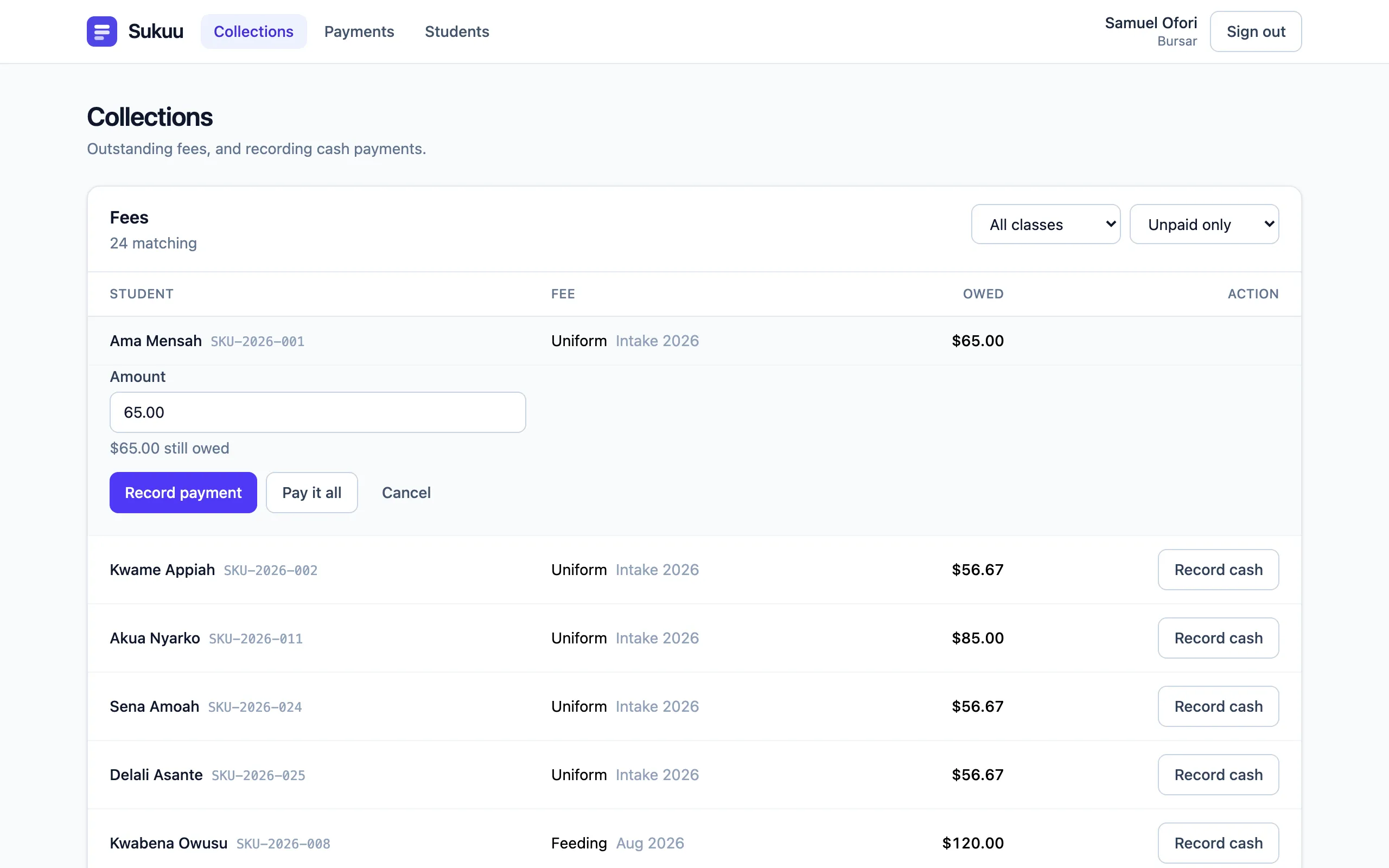
A bursar takes a payment at the desk and records it against the right fee in place, from a phone if that is what they have.
Parents pay online
Card payments through Stripe, or — for Ghana — card, bank and mobile money through Paystack. Which processor a school uses is a configuration choice, not a different product.
Money is never a floating-point number
Amounts are exact decimals in the database, in the server and on the wire. A fee is never off by a cent because of how a computer stores fractions.
Two payments cannot overpay a fee
If a bursar records cash at the same instant a parent's card clears, the two are serialised rather than racing. Money that arrives and cannot be applied is flagged for a person instead of being silently dropped or refused.
Collected against outstanding
One screen for the administrator: what the school has collected, what is still owed, and the same split for every class.
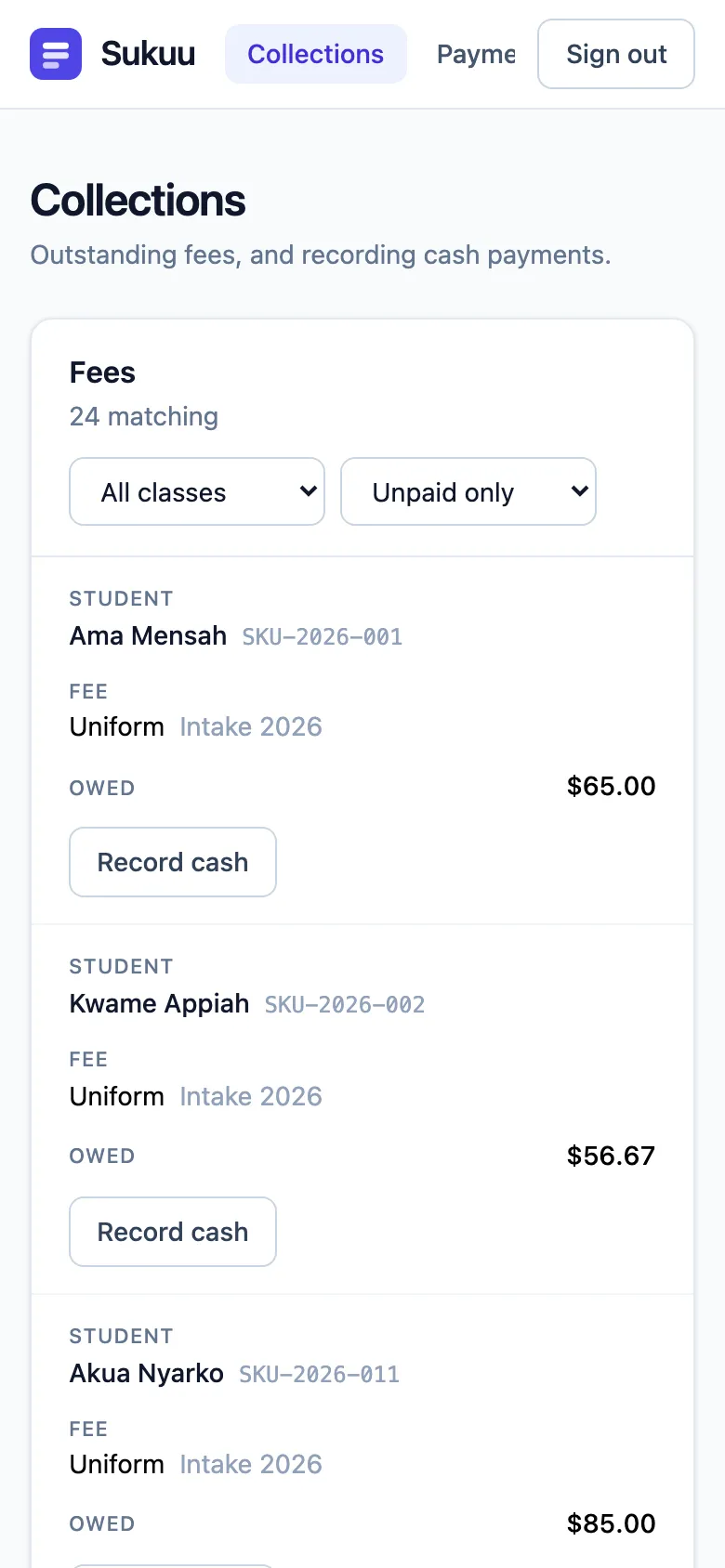
An outstanding-fees list for the bursar
Who owes what, searchable and paged, with a payment form on the row. Plus full payment history per student and across the school.
An audit trail
Every action that touches a record or a balance is written down with who did it, when, and from where.
Login protection
Failed sign-in attempts are throttled per account and per source address, so neither a targeted guess nor a spray across many accounts gets a free run.
Built for the phone first
A bursar at a school gate is not sitting at a desk. Tables fold into cards on a small screen rather than scrolling sideways.
A look at it
The actual screens
Not mock-ups — these are photographs of Sukuu running. The school, the families and the figures in them are seeded demo data, and the card payment is a processor test transaction, so no real money and no real child appears anywhere below.
On the way
Coming soon
Specified, designed and next in line — but not finished, so not claimed. A pilot school has a real say in the order these arrive.
- Coming soon
Mobile money, verified live
The Paystack integration is written and tested, including the signed webhook and mobile money as a payment channel. The final walkthrough against a live test account is the one step still outstanding.
- Coming soon
Accounts and invitations
Today families are loaded by a setup script. Next: an administrator creates staff and parent accounts and invites parents by SMS or email, with set-password and reset flows, and a phone number as a login alongside an email address.
- Coming soon
Import from your spreadsheet
Upload the student list you already keep, see exactly what will be created and what could not be read, and nothing is written until you say so.
- Coming soon
Terms, waivers and discounts
Academic years and terms as real records, balances carried forward into a new term, and scholarships, waivers and sibling discounts as proper adjustments with an audit row each.
- Coming soon
Receipts and statements
Numbered printable receipts a parent can walk away with, a year-end statement per family, and a spreadsheet export of any list.
- Coming soon
SMS confirmations and reminders
A text when a payment lands, and fee reminders on a schedule the school sets.
- Coming soon
Two guardians per student
Real households often have two people who need to see the fees and be able to pay them.
- Coming soon
More than one school per deployment
Today one school runs on its own deployment, which is the right answer until it is not.
Attendance, grades and timetables are deliberately not on this list. Sukuu is about money, and does that one thing properly.
Who it is for
Three people, three jobs
Sukuu has three roles because a school office has three jobs. Each one sees the screen their work starts on, and nothing they have no business seeing.
Administrators
Set up the school year, define what the school charges, bill a class in one action, and see collected against outstanding without assembling it from anywhere else.
Bursars and office staff
Work from the list of who owes what. Take a cash payment and record it against the right fee on the spot, from the desk or the gate. See every payment the school has taken.
Parents and guardians
See an itemised list of your own children's fees and what is still owed — and nobody else's. Pay in full or pay part of it, by card or mobile money, without a trip to the office.
Bursars and office staff share one role in Sukuu today: they can see every fee and payment and record cash, but they cannot change what the school charges or who is enrolled. Finer-grained staff permissions are a thing a pilot school can tell us they need.
Security and data protection
A school's money and a child's record
Sukuu holds two things that deserve care: a school's finances and a list of its children. These were decisions taken before the first screen was drawn, not patched in afterwards.
Permissions are enforced in the API. What the interface hides is signposting; what the server refuses is the actual boundary.
A parent who asks for another family's child is told the record does not exist, rather than that it exists and is forbidden — so student IDs cannot be walked to learn the school roll.
Passwords are hashed with bcrypt over a SHA-256 digest, so a long passphrase is protected by all of its entropy rather than its first 72 bytes.
Sessions are signed tokens, verified against a fixed algorithm allow-list so a forged token cannot talk its way in.
Card and mobile money details never reach Sukuu. The payment page belongs to the processor; Sukuu only learns that a payment succeeded.
A payment is written to the ledger only on a cryptographically signed message from the processor — never because a browser arrived at a success page. A message replayed twice records once.
Every action that touches a record or a balance leaves an audit row: who, what, when, and from which address.
There are no delete endpoints anywhere. Classes are archived and students are made inactive, so a school's history cannot be wiped by accident or on purpose.
Run your fees on Sukuu
We are looking for a small number of schools to use Sukuu while it is still being shaped, and to tell us plainly where it falls short. If your fees live in a receipt book and a spreadsheet today, that is exactly the situation it was built for.
A pilot conversation starts with you describing how fee collection works at your school now. Nothing has to be installed for that.